Selected work

Case studies from focused systems built around real operating needs

Every entry below is live. Only verified project information is published — no invented metrics and no placeholder quotes.

Client projects

Built for an external client.

Representative interface — sample data, not a client system.

Interface summary

What the pre-flight workspace puts on one screen

  • Live weather read against the operator's own limits
  • A 17-step release checklist run in sequence
  • Authorisation, crew, aircraft and site status
  • Operational alerts and pilot-in-command notes
  • A release gate that a person has to action

01Client projectUnmanned aircraft operations

UA Ops Preflight

A controlled pre-flight release workspace that reconciles weather, authorisation, crew, aircraft and site checks in one place.

Before
Weather, authorisation, crew, aircraft and site checks sit in separate documents and apps, and the pilot in command reconciles them from memory under time pressure.
After
The same checks are reconciled on one screen, and releasing a flight is a deliberate action with the pilot's notes attached to it.

Who uses itThe pilot in command, and the crew around them who have to agree a flight is ready.

  • Live weather envelope with editable operating limits
  • 17-step controlled pre-flight release checklist
  • PIC notes, operational alerts and release-gate workflow
Status
Live

Representative interface — sample data, not a client system.

Interface summary

What the sorting tool puts in front of an operator

  • A folder plan previewed before anything is written
  • Numbered inspection run folders, one per detected boundary
  • An adjustable pitch tolerance, defaulting to 2°
  • An opt-in altitude-reversal fallback for flights with no marker
  • A CSV report recording why each folder was started

02Client projectDrone building inspection

PFI Sorting

A sorting tool that reads drone photo metadata and splits a building-inspection flight into numbered inspection run folders, using the straight-down camera marker pilots already fly.

Before
An inspection flight comes back as one long photo stream, and someone separates hundreds of images into roof faces, elevations and passes by hand.
After
The tool reads the marker already sitting in the photo metadata and writes the flight out as numbered inspection run folders, with a report of why each folder was started.

Who uses itWhoever has to work through the photographs an inspection flight produced.

  • Pitch-marker detection across the embedded metadata fields drone vendors use
  • Automatic split of a flight into numbered inspection run folders
  • Optional altitude-reversal fallback for flights missing a marker
  • Command line, local web interface and browser app over one sorting engine
Status
Live
  • Python
  • Vercel

Representative interface — sample data, not a client system.

Interface summary

What the site puts in front of a shipper

  • A freight service and coverage overview
  • Quote capture shaped around what a freight quote needs
  • A responsive multi-page layout for mobile and desktop

05Client projectNS Logistics Global · Logistics and freight forwarding

NS Logistics Global

A responsive multi-page website that sets out freight services and coverage, then captures interest as a structured quote request.

Before
Freight enquiries arrived from several directions and rarely carried the detail needed to quote.
After
Services and coverage are set out publicly, and an enquiry arrives as a structured quote request that can be actioned.

Who uses itProspective shippers checking coverage, and the team that has to quote what they send in.

  • Responsive multi-page website across mobile and desktop
  • Service and coverage overview for the freight offering
  • Enquiry and quote capture built into the site
Status
Live

Interface summary

What the site puts in front of a golfer

  • In-stock grip options and order-in catalogue prices
  • Filters for club grips, putter grips and bring-your-own installation
  • Shaft-cutting prices and finishing add-ons
  • A service estimate with a WhatsApp enquiry action
Written summary, not a screenshot. No product image is published for this build yet.

06Client projectAsh Regripping · Golf regripping and shaft services

Ash Regripping

A responsive golf-service website with a grip catalogue, service pricing and an interactive estimator that prepares a WhatsApp enquiry.

Before
Before a service can be confirmed, a customer needs to choose a grip or shaft service, specify the number of clubs and check the price and availability.
After
The website brings those choices into a catalogue and estimator, then prepares a WhatsApp message with the selected service for the customer to send.

Who uses itGolfers comparing grips and service options before arranging work on their clubs.

  • Responsive website presenting regripping, shaft cutting and finishing services
  • Separate in-stock selection and filterable order-in grip catalogue
  • Interactive price estimator for the selected service and number of clubs
  • Prepared WhatsApp enquiries carrying the customer's service selections
Status
Live
  • HTML
  • CSS
  • JavaScript
  • Vercel

PSOI group and internal products

Built inside the PSOI group rather than for an independent client. Listed separately so the distinction is never left to inference.

Interface summary

What the onboarding entry point contains

  • A single public page describing the intake path
  • A structured next-step flow for a new enquiry
  • A mobile-first layout, widened for desktop
Written summary, not a screenshot. No product image is published for this build yet.

03PSOI Group companyProfessional services

PSOI Services — Client Onboarding

A public onboarding entry point that moves service enquiries from interest to a structured intake flow.

Before
An enquiry arrived with no defined entry point, so intake began as an unstructured conversation.
After
One public page takes someone from interest through to a structured intake flow.

Who uses itNew PSOI Services clients, at the point of first contact.

  • Public onboarding entry point for PSOI Services
  • Clear next-step flow for service enquiries
  • Responsive website experience for mobile-first prospects
Status
Live

Interface summary

What the product surface presents

  • Online, recurring, in-person and developer-led channels in one structure
  • A merchant-facing overview of what a business can accept
  • Developer-facing detail kept underneath, not at the front
Written summary, not a screenshot. No product image is published for this build yet.

04PSOI Group companyPayments

PSOI Pay

A single product surface presenting online, recurring, in-person and developer-led payment capabilities.

Before
Online, recurring, in-person and developer-led payments were described on four disconnected pages.
After
The four channels share one information structure, so a merchant can see how they relate in a single view.

Who uses itSingapore merchants deciding how they want to accept payments.

  • Unified product experience across core payment channels
  • Clear merchant-facing overview of payment capabilities
  • Responsive experience for desktop and mobile visitors
Status
Live

Concept builds and interface studies

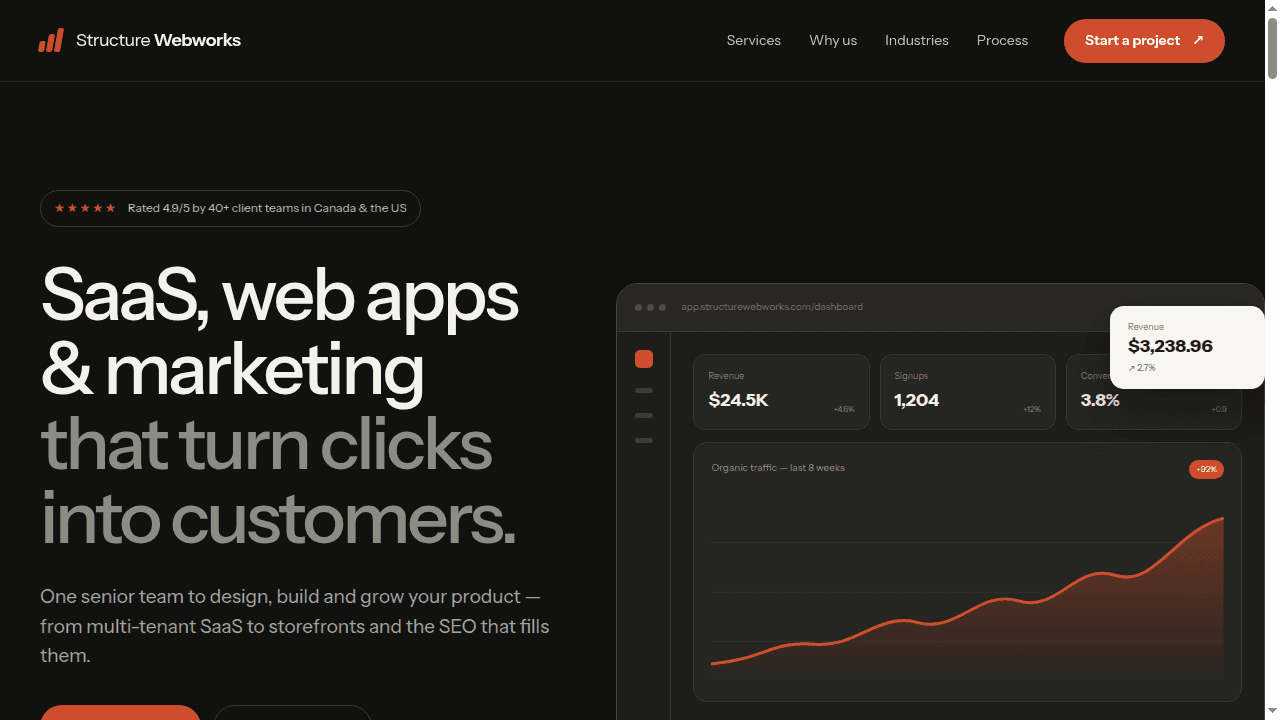
An independent front-end study built from a public reference. It was not commissioned by, and is not affiliated with, the reference brand.

Desktop view of the Structure Webworks front-end study showing the hero and product analytics interface
Desktop implementation of the independent front-end study.

07Independent concept studyDigital product and growth agency

Structure Webworks — Front-end Study

An independent responsive front-end study recreating the structure, visual rhythm and product-led presentation of a public agency website without presenting it as commissioned work.

Before
The local recreation stopped after the opening section, with placeholder links, no complete mobile flow and no durable route on the PSOI Tech site.
After
A complete responsive study now carries the design language through services, process, proof and contact sections, with an isolated live demo and explicit attribution.

Who uses itProspective buyers comparing an agency's services, delivery model and proof before making contact.

  • Complete responsive homepage from hero through final call to action
  • CSS-built dashboard, service and workflow illustrations with no stock imagery
  • Mobile navigation, keyboard focus states and reduced-motion support
  • Isolated static demo route so the study cannot leak styles into the PSOI Tech site
Status
Concept demo
  • HTML
  • CSS
  • JavaScript
  • SVG

Publication policy

Optional project fields are omitted until the owner verifies them.

Next step

Have a deadline that matters?

Describe the operating problem, the outcome you need and roughly when. You will receive a clear next step within 48 hours.